THE SMITH SCHOOL
WINTER SHOWCASE 2025
THE SMITH SCHOOL
WINTERSHOWCASE 2025
Robotics
🤖
Robotics 🤖
I made a trivia game in Thonny. It asks you multiple-choice questions, then depending on your answer an LED will light up. I learned a lot about coding in Thonny, and also how to use the Raspberry Pi Pico. I really liked the coding in Thonny; that was probably my favorite part.
— Henry
Raspberry Pi Trivia - Henry
Raspberry Pi Binary Translator- Madox
My project uses conditional statements and LED configurations to display a choice from three pre selected words in a binary format at a speed chosen by the user.
— Madox
Raspberry Pi Trivia- Jayden
My name is Jayden and the mini python project i created is called a trivia question light up game which i coded with thonny. I used a raspberry pi pico, two wires (which are connected to the ground pins), two leds, and two resistors to make sure the colors went off correctly. The ground is used to complete the circuit. How I wrote my code was I used import sleep, import pin, if statements, the pin numbers for both leds, and the else functions. When I run my code, the first question will pop up waiting for an answer. I also wrote the questions and answers to determine which led is right or wrong. For example, one of the questions is “What is the capital of france” so if i type paris lower or uppercase, the led lights up green indicating that you are correct. Another example is the last question “How many legs does a spider have?” so if you type the answer as 8, it will stay green. However, if you type in the wrong answer, the led will change from green to red. Overall, I had fun making this mini python project but i also learned the different functions and code of python.
— Jayden
Raspberry Pi Pocket Monster Battle- Clay
I made a Pokemon knockoff, using emoticons, LEDs, and MicroPython. I learned about pinouts, MicroPython, and different components.
— Clay
Computer Science
🖥️
Computer Science 🖥️
Game Development - Clay, Alex, & Nick
Our project made by Clay, Nick, and Alex was to create a slide show about a game we would come up with. That game being blob man; a puzzle game where you play as a blobfish with legs that uses elemental abilities to solve puzzles. The point of doing this was to show us how much goes into a game, and to teach us how to do it. In the end it was (and is) a blast,
and we learn a lot about the game making process. And for our favorite part it would have to be the brain storming before we got to work.
—Clay, Alex, and Nick
My project is a precise position tracker that will assess the position of the user's cursor and will quantify the accuracy of the user's clicks on a dot that is randomly generated on a location on or off a dartboard that I created as the background for my project. In order to create my project I had learned how to use python ( which is a programing language) and used the raspberry pie code editor to form and compile multiple lines of code consisting of variables, functions and several other different types of code that help me make my project perform as I envisioned.
—Neftali
Python Coding - Neftali
HTML & CSS - Jayden
My project this year was creating a webpage for any topic. For example, I did a webpage for the raspberry pi pico which was really fun. I learned alot of things such as how to create one, the steps, & the different codes to use. Overall, I had a pretty fun experience with this and hope to see others give it a try if interested!
— Jayden
HTML & CSS - Angel
My project showcases the five most used emojis, which I’ve put into a little ranking system from 1 to 5. I learned that organizing everything is how the code finds its “buddy,” and if it can’t find the other code or reaches the end of its section, it just won’t work. My favorite part of this project was seeing how, after I started organizing everything, it all began to come together. It felt like I had been missing something all along, and organizing my code made everything so much easier.
— Angel
HTML & CSS - Alan
In this class I learnt how to code using HTML and CSS. I was taught that the head tag is all the code that you don't see, like putting the code for the fonts. I also learnt the body tag which is all the main content that you see such as pictures or words. In my project Flip The Treat Webcard. I used the div tags which are in the body tag to put everything in its positions on the front and back of the card. The div tag also makes it so when you flip the card you don't see the words on the picture. I also used the tag h for heading to show the words on top of the p tag for paragraphs which is the word underneath. To get different fonts for my heading and paragraph I went to fonts.google.com select a font, copied its code and put it in the head tag as well as the style.css then In the p tag I put class =“(fonts name)” so it would know for that text I want this font. I did the same thing on the head tag.
— Alan
3D Modelling - Blaze

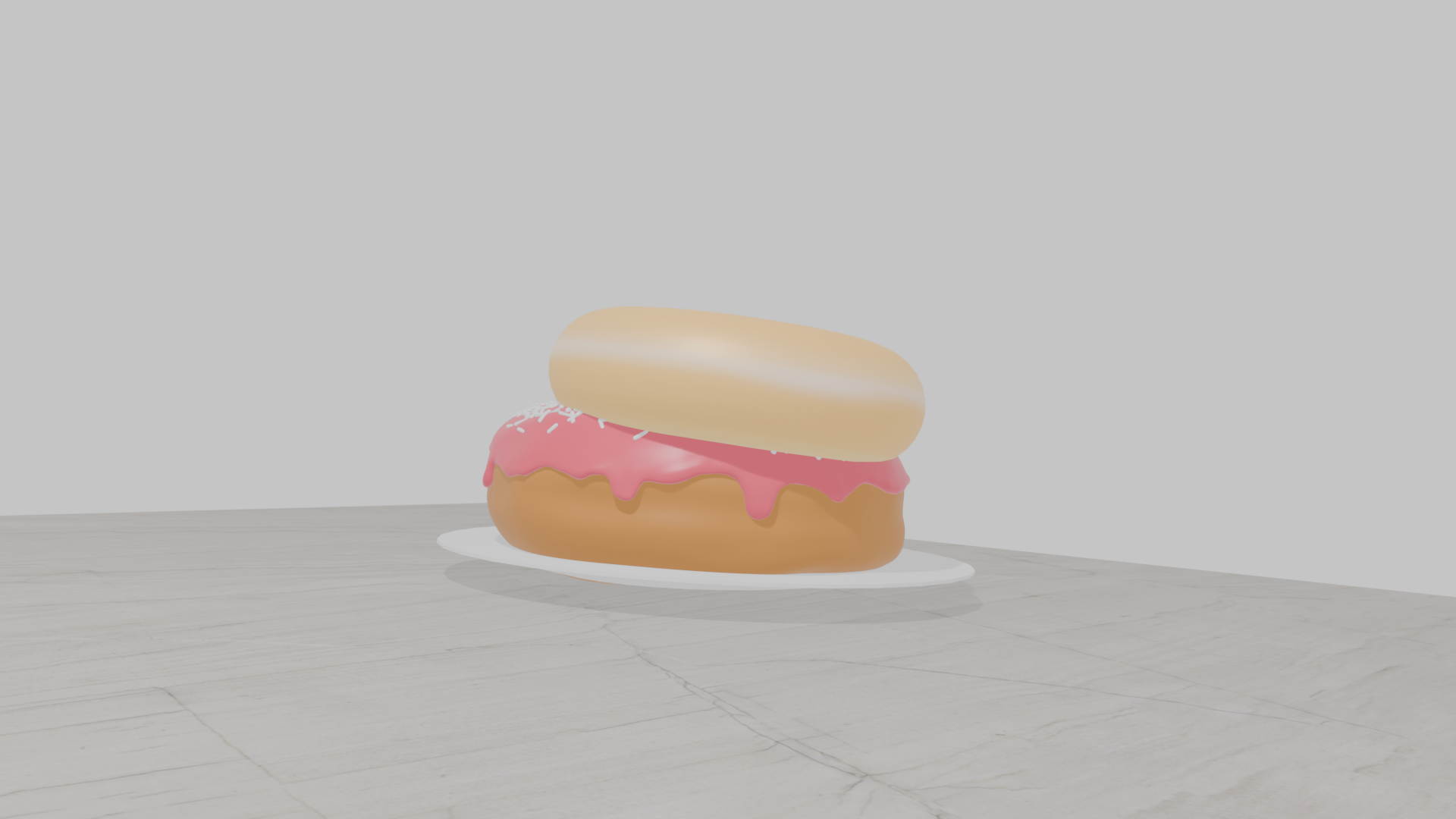
After spending an entire month on my very first donut, my peers and I realized that I needed to remake it. So I did. After recreating my donut and suffering through the grueling process of setting up all the faces, I can now say that I’m a master of my craft.
Included is an image of two of my donuts: thre one on top is my very first attempt, and the one below is the new version. But I still wouldn’t eat them they look like clay.
All I have to say is this: Blender is Blender. Great software for great people. I love it… but not enough to actually pay for it. Still, it’s alright.
10/10
— Blaze
Scratch Coding - Mateo
My work is called, The Man Face Bug. This game was created by Scratch, a coding platform. The final piece took weeks to create and illustrates one of my favorite things. This game has a few characters. There is a parrot with a man face who shoots poop and fart to annoy the player There is also a bug with a Man face which you find and click on as fast as possible. I think my project is great because it's a video game that I made for myself. My favorite part of the project was the part where I made a findable manface bug and parrot. During this project, I learned how to make the characters by coding using the code blocks.
— Mateo
Scratch Coding - Ben
I learned the daunting task of coding, even if it's only a simplistic platform such as scratch. I faced many internal turmoil when doing it. Many of the instructions were vague and up to my interpretation. It was a perilous journey, but the culmination of the project was worth it, I learned many things about coding through the adventure.
— Ben
Scratch Coding - Siraj
A game where you tap the mouse or the space bar to jump from log to log to the end to win. When I was making this project I learned that I can make things move automatically without me pressing them. My favorite part of the game was coding the jumping and winning it for the first time.
— Siraj
Scratch Coding - Brandon
My project is a city at night where a cat is trying to catch the bus. The bus is going to Comic-Con. To make this design, I needed to code it on Scratch. One thing I learned is that coding is fun! My favorite part of the project was seeing it when it was done.
— Brandon
Web Dev- Liam